Search for answers or browse our Knowledge Base.
Guides | Models | Validation | Book
Evolution of AN-SOF: New Features and Enhancements from Version 6.20 to 7.90
The rapid development cycle of AN-SOF between 2021 and 2022 has introduced a significant suite of tools designed to bridge the gap between core electromagnetic simulation, CAD interoperability, and large-scale data processing. This article summarizes the key features added from version 6.20 through version 7.90.
Versatility in Data Export and CAD Integration (v6.20 – v6.40)
The focus of the late 2021 releases was on interoperability and user workflow.
- Radio Mobile Compatibility: Radiation patterns from AN-Polar can now be exported as .ant files, allowing for direct integration into Radio Mobile for terrain-based propagation analysis.
- DXF Export: Linear wires can be exported in DXF format, enabling users to view and verify antenna geometries in CAD software like Autodesk Viewer.
- Spreadsheet Input: A new tabular input system allows for the entry of wires, sources, and loads in a spreadsheet format, catering to users who prefer numerical grids over graphical manipulation.
- Navigation: Enhanced UI features include a “Recently Open Projects” list and the implementation of mouse wheel/touchpad zooming for more fluid workspace navigation.
Automation and Bulk Processing (v7.0 – v7.10)
Version 7.0 marked a shift toward high-volume simulation and scripting capabilities.
- Bulk Simulations: Users can now run multiple input files simultaneously, significantly reducing the time required for parametric studies. This feature includes native support for NEC format input files.
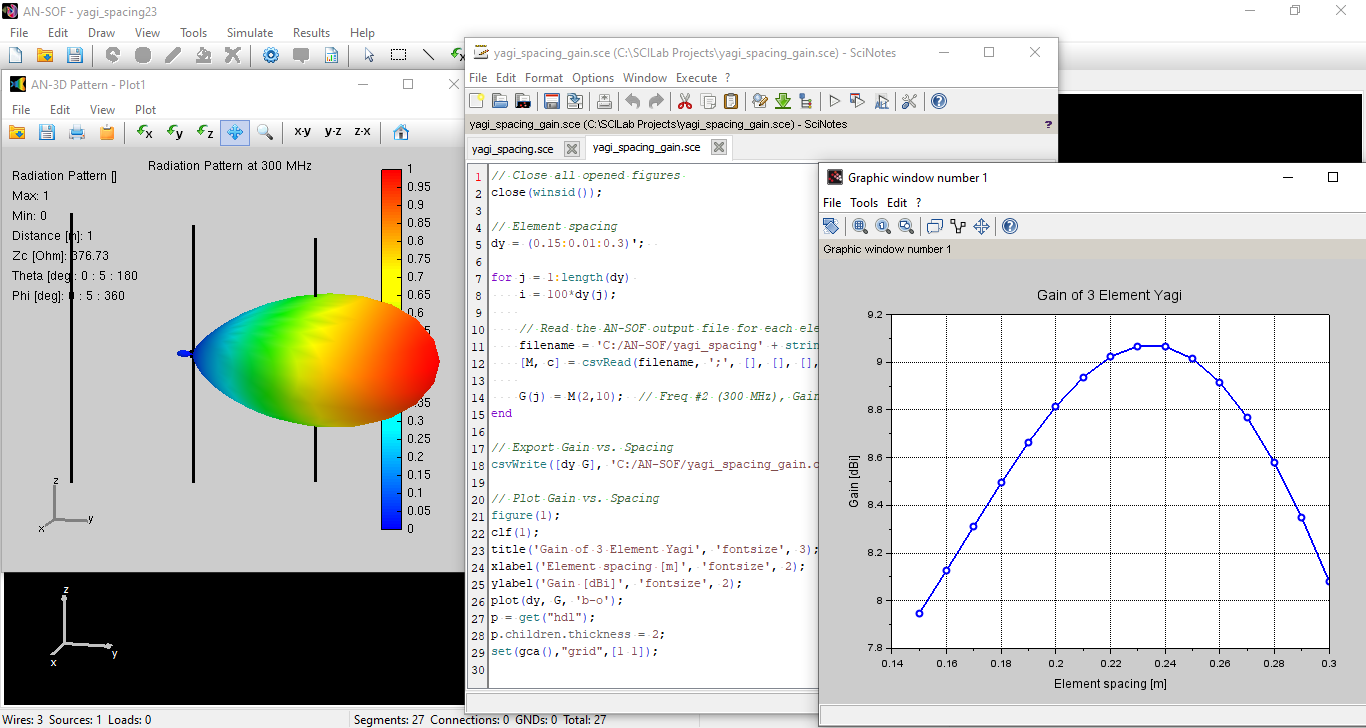
- CSV & Scilab Export: All computed parameters (gain, VSWR, impedance, fields) are automatically saved as CSV files. Furthermore, designs can be exported to Scilab (*.sce) format, enabling advanced scripting for variable geometric parameters.
- NEC Command Support: Implementation of the NEC GN command for real ground modeling, which can also be exported to Scilab scripts for automated ground-effect analysis.
Dynamic Visualization and Support (v7.20 – v7.50)
Mid-2022 updates focused on real-time feedback and expanded legacy file support.
- Frequency Dynamics: AN-3D Pattern now allows users to observe real-time changes in radiation patterns, near-field heatmaps, and current distributions as the operating frequency is toggled.
- Expanded NEC Support: Improved compatibility for legacy workflows with the addition of RP, LD, GM, GS, GH, GA, and EX5 command importation. An error report in the Note panel provides immediate feedback during the import process.
- Quick Access Tools: The addition of the Zin button on the toolbar and a direct Results tab allows for instantaneous viewing of input impedance and VSWR without needing to select individual segments.
Analysis Optimization and UI Refinement (v7.80 – v7.90)
The most recent updates have refined how results are interpreted and presented.
- Enhanced Results Tab: A dedicated tab now displays directivity, gain, efficiency, and VSWR in one location, with an Export Results button for one-click spreadsheet generation.
- ARRL-Style Scaling: AN-Polar now supports the classic ARRL log scale, facilitating direct comparison between simulated data and standard antenna literature or magazines.
- Advanced Polar Metrics: Front-to-Rear (worst-case) and Front-to-Back (180-degree) ratios are now automatically calculated and indicated on polar plots.
- Industry Standard Formats: Added support for exporting radiation patterns in MSI Planet format, a staple in professional RF planning.
- Visual Precision: Users can now toggle “Show Segments” in the Preferences window to visualize the underlying discretization of the wire structure, and the Frequency panel now automatically displays the corresponding wavelength during input.
AN-SOF Feature Evolution: Version 6.20 to 7.90
| Category | Key Features & Enhancements |
| Simulation & Calculation | Bulk simulation of multiple input files; Native NEC input support (RP, LD, GM, GS, GH, GA, EX5, GN); Real-time dynamic frequency sweeping for 3D patterns, heatmaps, and current distributions; Automated wavelength display. |
| Interoperability & CAD | Export to Radio Mobile (.ant) and MSI Planet formats; DXF export for CAD software; Scilab (.sce) script generation for parametric modeling; CSV data logging for all parameters; Tabular spreadsheet input for wires/sources. |
| Results & Analysis | ARRL-style log scale for polar plots; Automatic Front-to-Back and Front-to-Rear ratio calculations; Dedicated Results tab for impedance, gain, and efficiency; Customizable rectangular charts (AN-XY Chart). |
| User Interface (UI) | Zin toolbar button for quick impedance access; Segment visualization in the workspace; Mouse wheel/touchpad zoom; Error reporting for NEC imports; Direct technical support chat integration. |
Implementation Spotlight
Workflow Automation
The transition to v7.0 introduced the ability to bypass repetitive manual tasks. By exporting designs to Scilab, users can programmatically iterate through geometry changes, while the bulk processing engine handles the computational load in a single batch.
Visual Verification
The addition of the “Show Segments” feature and the dynamic frequency viewer in v7.20/v7.90 ensures that the physical discretization of the model matches the electrical requirements across the entire bandwidth, reducing the risk of numerical artifacts.